


-
Problem fixed. Apprently it was not DT's fault. It was Internet Explorer's fault. lol There is a bug in Internet Explorer 11 that causes the issue (along with the rest of the gadgets installed on the computer). All you need to do is uninstall IE 11 (through windows update). I feel silly lol. Thank you Terramex for helping me out . Here is the link: Fix for Gadget display issues after IE11 Installation on Windows 7 | gHacks Technology News
Just in case (for future cases).Leave a comment:
-
Please try the steps described in this answer:
Windows Sidebar starts w/inverted color scheme, is there a - Microsoft CommunityLeave a comment:
-
Just start the Autoruns.exe and wait until the Scanning is finished.
Then select File->Save... in the menu bar. Now zip the resulting Autoruns.arn file,
and attach it to your next post - or upload to a filehoster like firedrive, zippyshare, etc.Last edited by Terramex; 07.04.2014, 23:19.Leave a comment:
-
Maybe someone can spot a possible conflict/culprit in the Autoruns output.Leave a comment:
-
Please attach/upload a zipped Autoruns arn file (no installation required) - if you like.
As the forum provides more of an additional/secondary user-to-user support please also contact
the official support team with reference to this thread.Leave a comment:
-
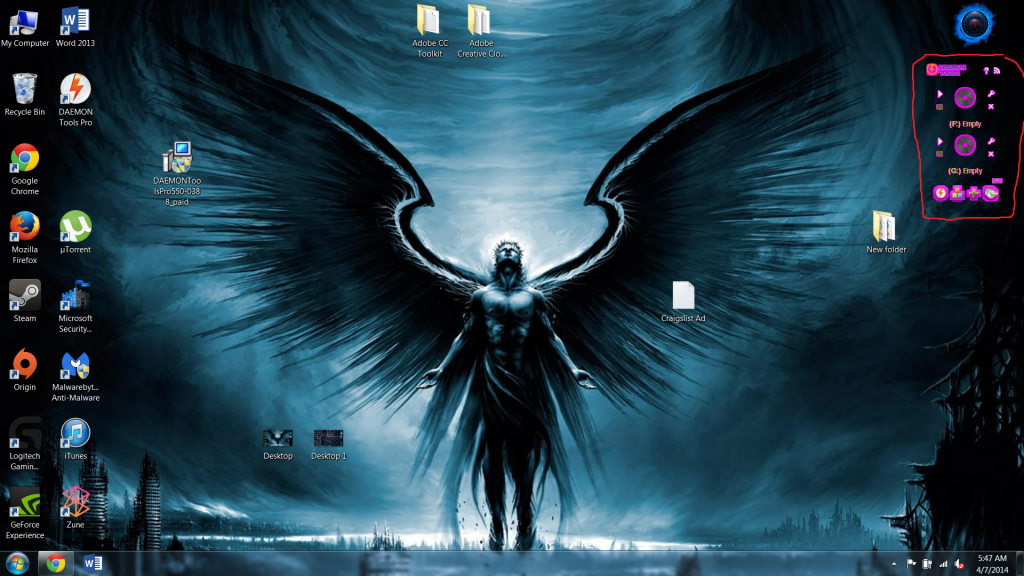
Nope. Still having the problem. I tried reinstalling the entire program. Changing the skin help a little but when I went to the other skin (the one that was on when it had the problem, it remained like the above picture. Any help
Leave a comment:
-
-
I have a problem with the Daemon Tools gadget.
Hey everybody. I have a quick question about the Daemon Tools gadget. I restored my computer to it's factory settings recently and finished updating windows. When my last windows update was done installing and I restarted my computer, this happened (I boxed it red for easy access). Please help me fix it Thank you for reading this, hope to hear back soon.


Leave a comment: